TABLE OF CONTENTS
- Update an Offer After a Raise (Delete Offer, Change Access, Hide Offer)
- How can I add custom pages to my platform? (Add content, microsite, custom webpage)
- How do I remove the ETH offering size on the page?
- How to change font size of headers on the Offer Details page? (HTML, Styling, Customization)
- How can I hide an offer in the marketplace?
- How can I allow an investor to start the investment process without signing up to use the platform?
- Is there a way to export the offer details?
- What is an offer symbol?
Update an Offer After a Raise (Delete Offer, Change Access, Hide Offer)
Once a raise is complete, the platform can be used to manage investments. Investors will be able to access their Portfolio and Documents to view investments and transactions.
If you need to update access to an individual offer:
- Select Offers from the left menu
- Click the offer you would like to update
- Choose Access on the left
- Use the Offer Visibility and Offer Status drop-down menus
- For more information on these options, click here
- For more information on these options, click here

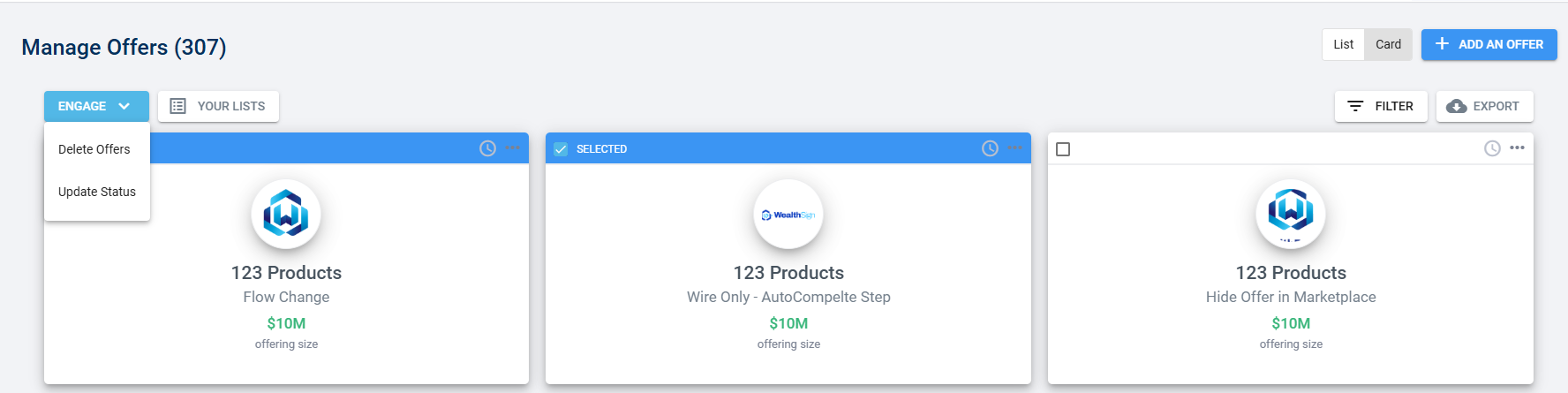
If you need to update or delete multiple offers:
- Select Offers from the left menu
- Click the checkboxes on any offers you would like to update
- Click Engage
- Choose either:
- Delete Offers
- Update Status
How can I add custom pages to my platform? (Add content, microsite, custom webpage)
To add a new Custom Page, you can follow these steps:
- Navigate to Platform
- Select Settings
- Click Pages
- Choose Custom Page
- Expand the Select a Custom Page drop-down menu and click the Create a New Page
- Make any updates needed and Save Custom Page
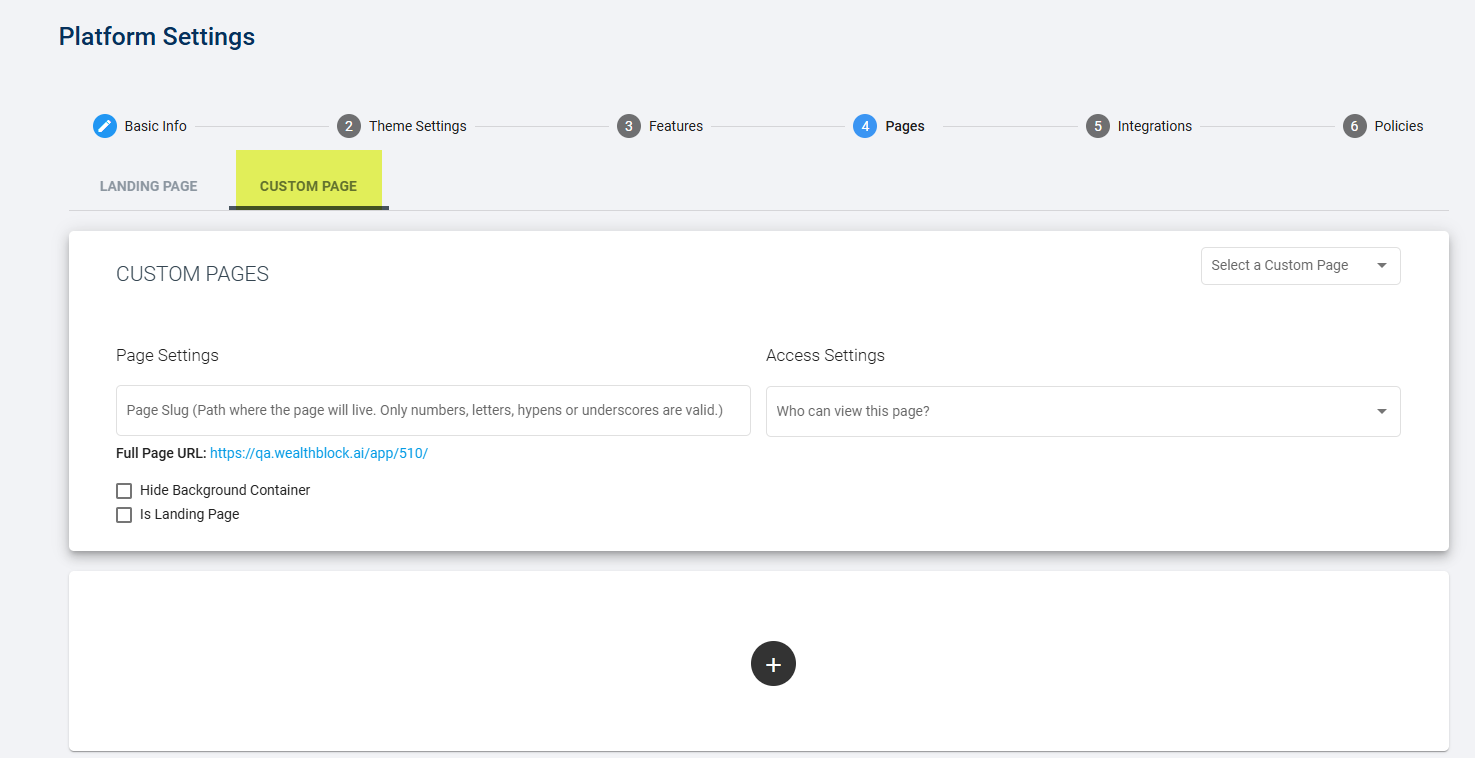
The same tools present when building a new offer are available to add styling to your page, including text, images, decks, graphs, etc. You can save your URL to share with individual investors, or you can select Is Landing Page to direct users to your page after they have logged in to you platform.
For example it can look like this:

REF: You can also add your page as a Navigation Link. For steps on how to add a Navigation Link, click here.
How do I remove the ETH offering size on the page?
To remove the ETH offering size:
- Select Platform from the left menu
- Click Settings
- Choose the Features tab
- Uncheck the option to Include Blockchain Integration

Reference:
How to change font size of headers on the Offer Details page? (HTML, Styling, Customization)
If you need to update the size of any section headers you add to your Offer Details page, you can do in two ways.
HTML:
The font size can be altered using HTML.
To do so:
- Select Offers from the left menu
- Click into the offer you would like to update
- Choose the Offer Details tab
- Use the plus icon to add a new Text or Summary section, or the pencil icon to edit an existing section
- Add the following to the Title field
- <h1>YOURTITLE</h1>
- Click Save Changes


Text Editor:
The font size can also be changed by omitting Titles and using the available text editor.
To do so:
- Select Offers from the left menu
- Click into the offer you would like to update
- Choose the Offer Details tab
- Use the plus icon to add a new Text or Summary section, or the pencil icon to edit an existing section
- Remove any text from the Title field
- Instead, add text to the text editor
- Use the drop-down menu to select the font size
- Click Save Changes

How can I hide an offer in the marketplace?
If you would like to keep an offer Active, but require an investor to click the offer URL to access it, you can enable the setting Hide In Marketplace. This way, an investor does not need to receive a dedicated invite to view the offer, but it is not present for all investors to view in the full list of active offers. You would need to copy the offer URL from the address bar in the Preview mode to share it, and any investor who has the URL would be able to see the offer. Offer URLs do not expire.
How can I allow an investor to start the investment process without signing up to use the platform?
If you would like to allow investors to begin the Investor Flow of your offer without first registering and creating an account, you can utilize the No Sign Up option. This setting enables investors to create their accounts while simultaneously creating transactions in the offer. Please reach out to the Support team for further guidance if you do not have this option in your platform, as the platform configuration may need to be adjusted first.
Is there a way to export the offer details?
Since there is not an export function available on an offer, the best option would be to use your browser's Print button to get the contents of the offer in a PDF. Another option would be to copy each element into a Word document for future use.
What is an offer symbol?
An offer symbol is a unique combination of letters/numbers assigned to an offer as an identifier. It can be found:
- In the URL of the offer
- On the Offers page in the List view
- By adding the Offer column to the Transactions page
- By adding the Offer column to Reports
The offer symbol is required to import new transactions or update existing transactions via import.
Was this article helpful?
That’s Great!
Thank you for your feedback
Sorry! We couldn't be helpful
Thank you for your feedback
Feedback sent
We appreciate your effort and will try to fix the article